← All workCase Study 01 · AI · Trust & Human Control
Clinical Triage AI: Who Decides First?
When a clinician and an AI disagree under pressure, the sequence of the interface can determine whose judgement becomes the anchor.
Independent human judgement first, AI support second, clinician responsibility always final.
Role
Human-AI Interaction Designer / Product Designer
Type
Self-initiated conceptual product
Year
2026
Focus
Calibrated trust / Clinical decision systems
Self-initiated conceptual product. Not clinically deployed or evaluated with emergency-care professionals. All patient, clinician, and clinical-scenario details are fictional and were created solely for product-design exploration. The fictional scenario uses the five-level Manchester Triage System as its urgency framework. The case study focuses on interaction architecture, decision provenance, and testable design hypotheses.
The Product
What it is
Clinical Triage AI is a clinician-facing emergency-triage application that brings patient observations, professional judgement, and optional AI decision support into one traceable workflow.
Its goal
To make an AI recommendation useful without letting it silently replace independent clinical judgement.
Who it serves
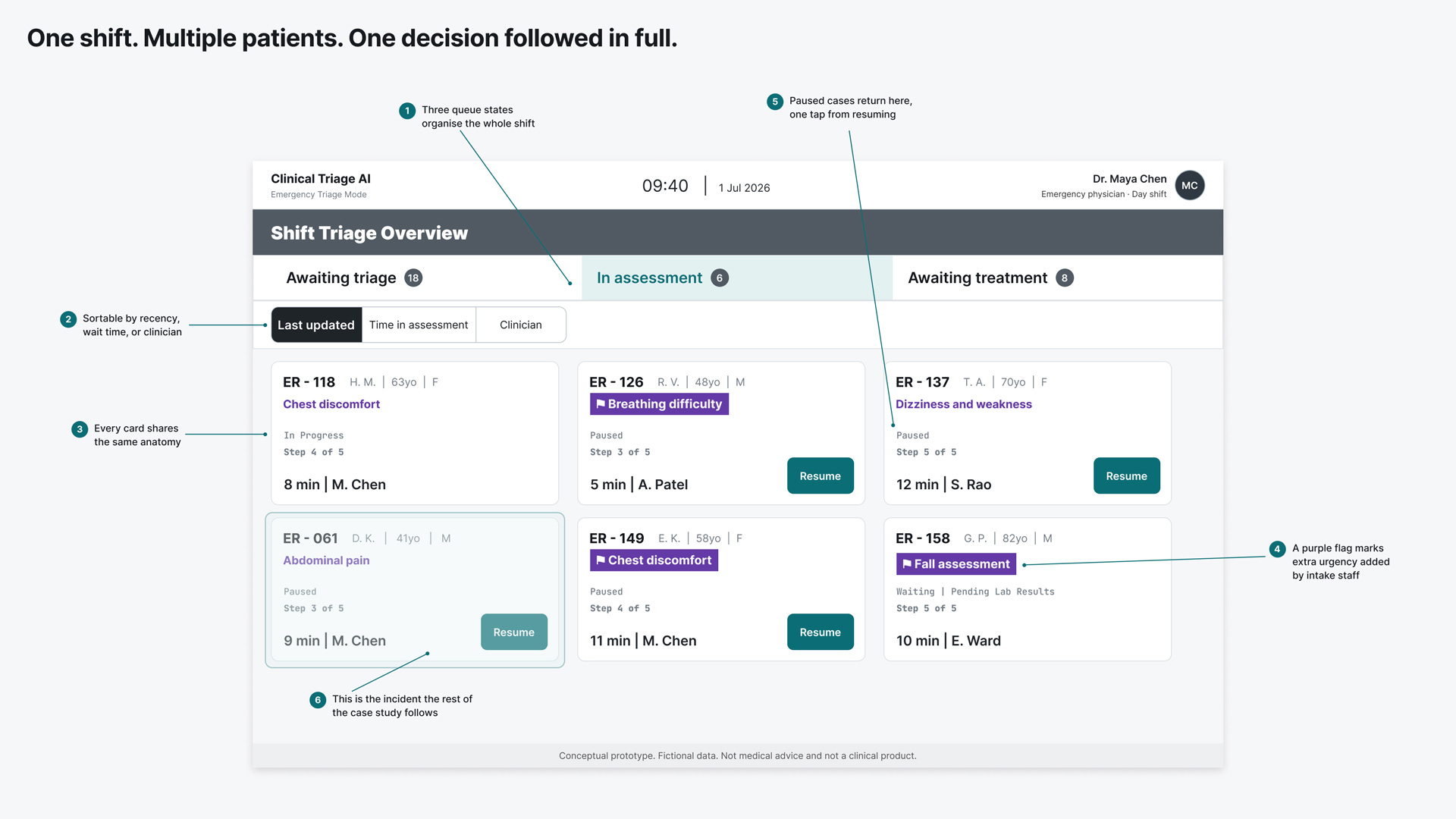
Emergency physicians and triage nurses working with incomplete, rapidly changing information — illustrated here through Dr. Maya Chen’s day shift and one patient, ER-061.
Where the stakes live
The patient carries the clinical consequence of a wrong prioritisation. The clinician remains responsible for interpreting the evidence.
Why This Case Study
What I wanted to learn
Whether the timing of AI output (before or after human judgement) changes the role the clinician actually plays in the decision.
Tools I set out to test
Figma for the product system and high-fidelity states; Claude for natural-language execution and iterative exploration; ChatGPT as a parallel critique and synthesis partner.
Workflow I wanted to adopt
Explicit scenario definitions, state inventories, decision records, and handoff documents — without the AI tools generating those states becoming the decision-maker. One example: when an AI tool flagged that a section I’d labelled “Relevant Findings” was clinically imprecise (the items were all confirmed absences, which the spec calls “Relevant Negatives”) I accepted the correction and reverted it immediately.
Why this product, specifically
Every shortcut here raised a harder question about influence, responsibility, or patient safety.
The Shift Triage Overview screen, annotated — the interface Dr. Chen works from all shift.
Why sequence is the whole design problem
Introducing an AI suggestion too early can anchor a clinician to the machine’s output before an independent position has been recorded — a pattern sometimes called automation bias. A warning telling clinicians to use their own judgement does not solve this. The sequence has to address the risk before the AI ever speaks.
The Argument
I did not design the product to maximise trust in AI. I designed for calibrated trust. The clinician forms an independent position before the AI appears. Friction increases only where the consequence justifies it. Provenance remains visible, and adoption, rejection, or non-use of AI remain legitimate outcomes. Reversible interruption stays fast, while permanent or risk-bearing actions demand greater deliberateness. The product succeeds when it supports a clear, clinician-owned, and traceable decision without allowing the machine to become its default author.
The architecture behind every moment
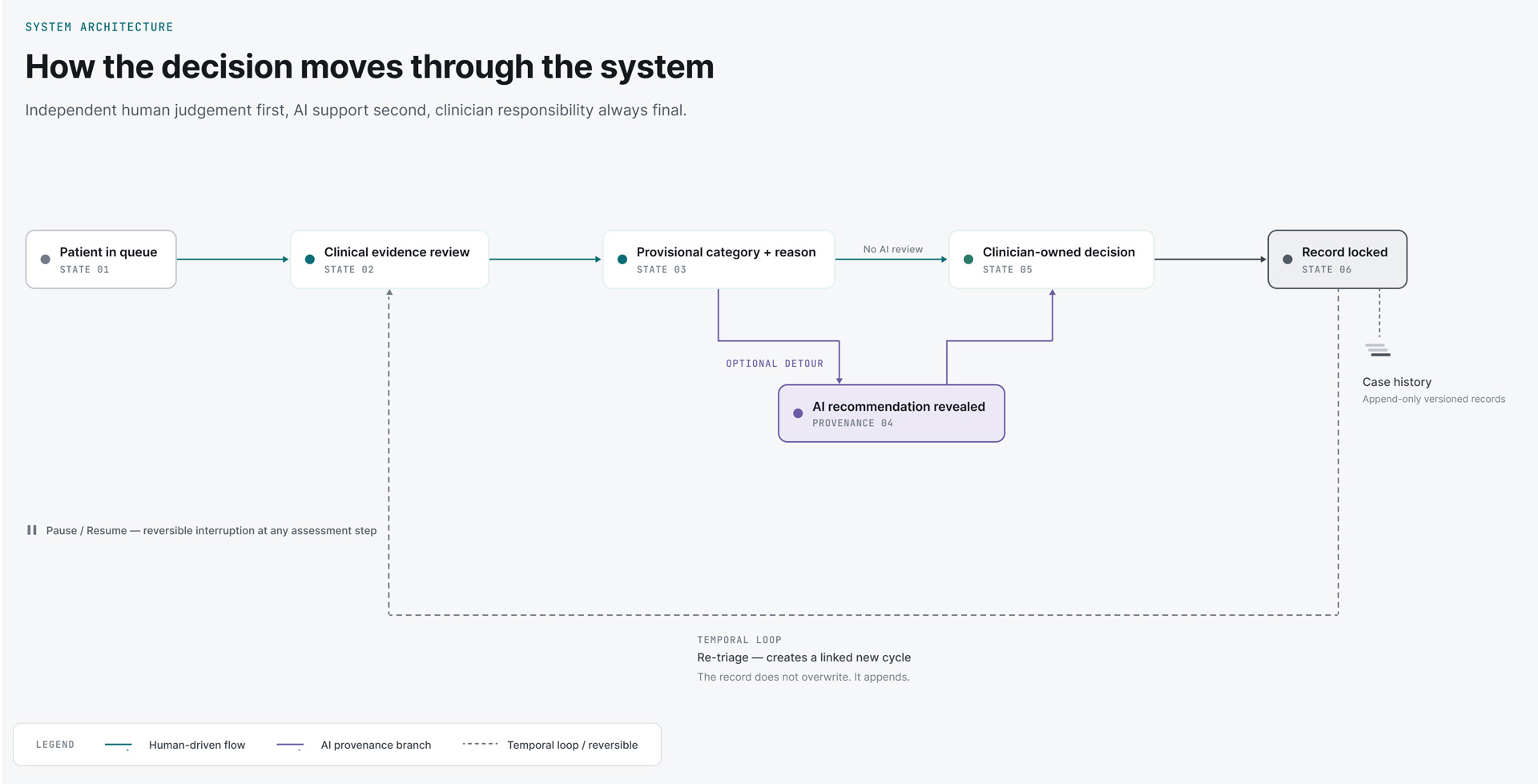
One human spine, one optional AI detour, one append-only history. Every decision moment below is a specific point on this map.
The architecture behind all eight moments — one human spine, one optional AI detour, one append-only history.
Nine decision moments
The first eight are interaction-design decisions. The ninth is a decision too (about honesty of scope) using the same format. Box labels are THE DECISION / WHAT THIS EXPOSED / WHAT I WOULD VALIDATE NEXT throughout: deliberate, so nothing here claims a validated outcome that hasn’t actually been tested.
01
Recording judgement before the AI speaks
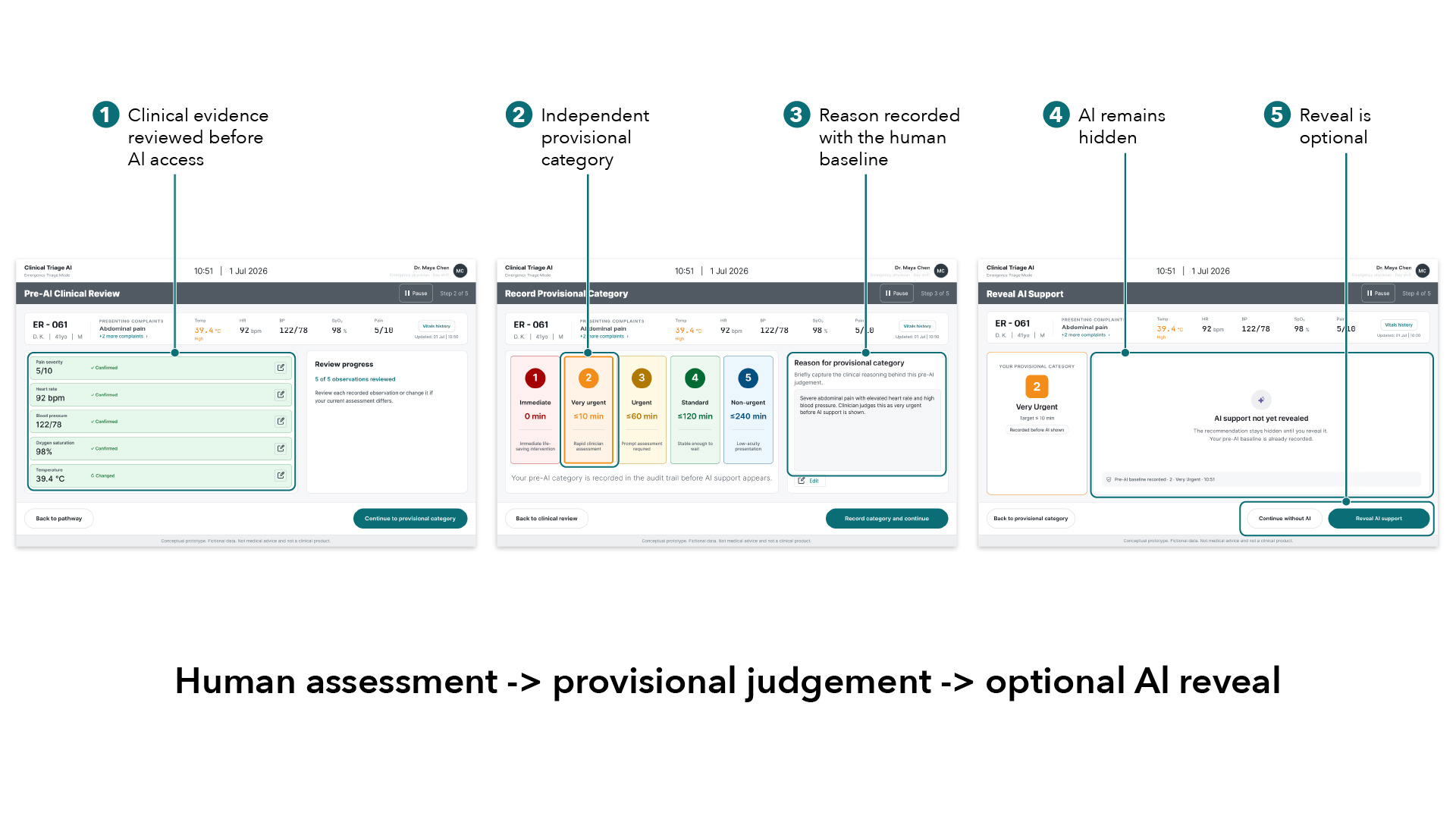
Before Dr. Maya Chen can see any AI input on patient ER-061, she has to complete two things: confirm every clinical observation herself, and record her own provisional urgency category with a reason. Only then does the option to reveal AI support even appear.
The clinician’s judgement becomes part of the record before machine influence enters the workflow.
The Decision
Required a provisional category and reason before AI reveal — a structural sequence that records a human position before in-interface AI influence begins.
WHAT THIS EXPOSED
Independence has to be built into sequence and state architecture. Copy alone cannot establish whether a position was recorded before the AI became visible.
WHAT I WOULD VALIDATE NEXT
Whether the pre-AI reason improves reflection, or just adds documentation friction under real time pressure.
02
Keeping the AI visible without giving it the first word
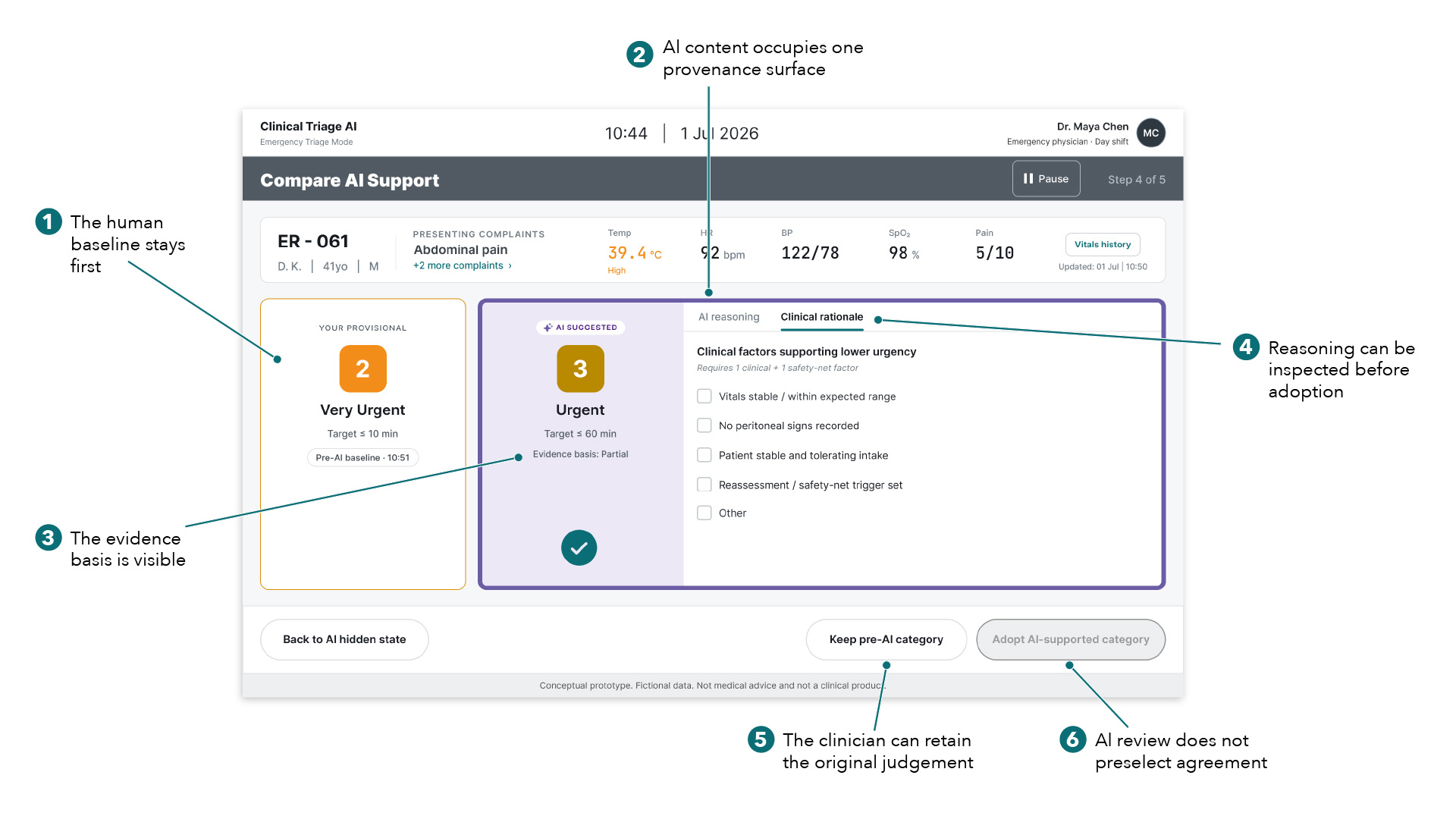
Dr. Chen has recorded her provisional category (2 – Very Urgent) before she ever sees what the AI thinks. When she reveals it, the AI’s suggestion, its evidence basis, and its model-provided rationale sit together in one clearly separate surface. Her own judgement stays first in the reading order, not folded into the AI’s.
The comparison preserves the human baseline while making the AI’s source, evidence, and limitations visible.
The Decision
Grouped the AI’s recommendation, model-provided rationale, and limitations into one visually distinct surface, with the clinician’s own category staying first.
What I Learned
Provenance is easier to read when it’s spatial and persistent, not just a label attached to a value.
Looking Forward
Whether clinicians can correctly attribute every statement to its source during fast scanning, including under colour-vision impairment.
03
Calibrating friction to consequence
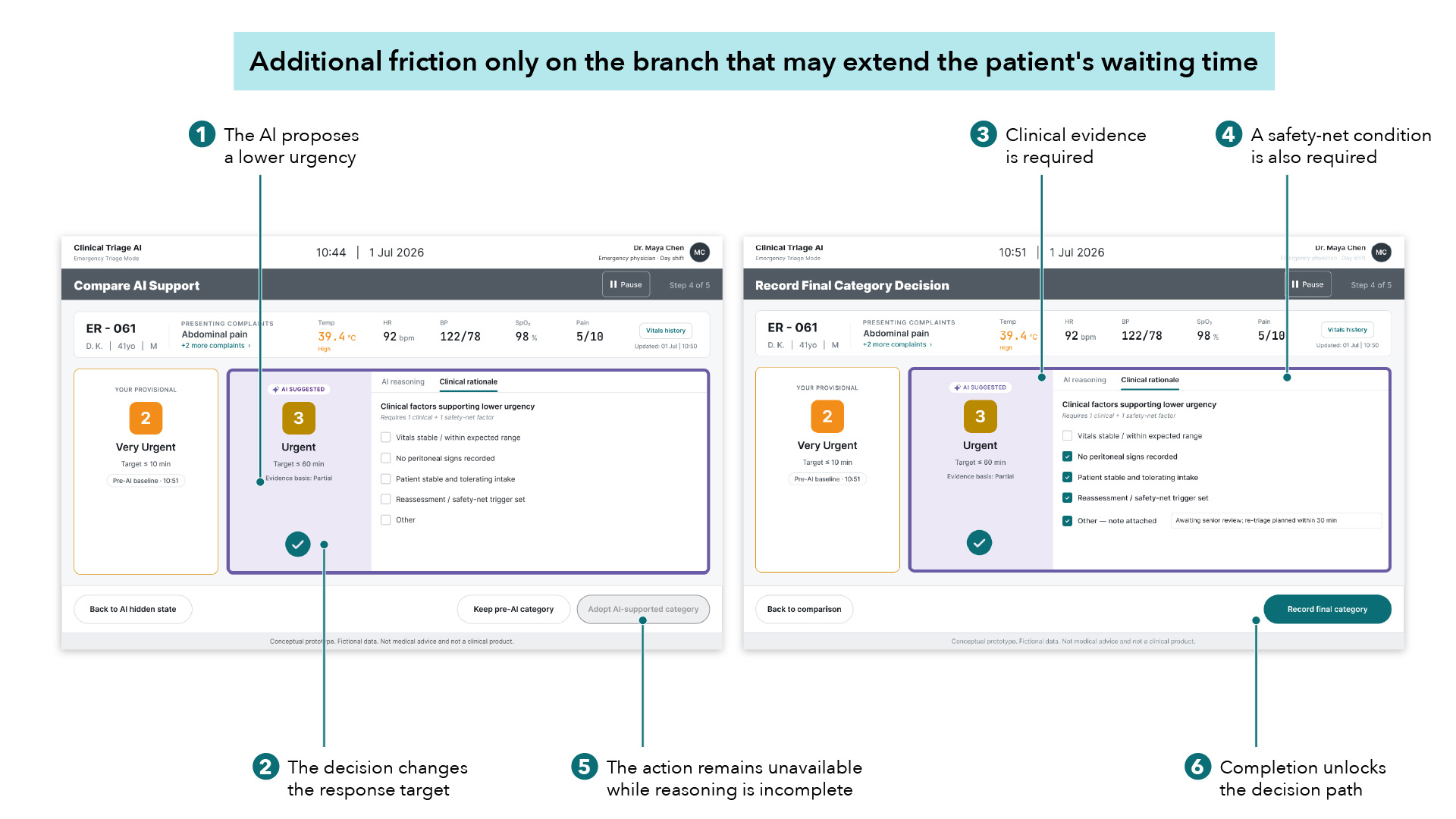
The AI suggests 3 – Urgent, one category lower than Dr. Chen’s own 2 – Very Urgent. Accepting that would extend ER-061’s target response time from 10 minutes to 60. Before she can adopt it, the interface requires a clinical reason and a safety-net condition. Escalating urgency would remain available without the additional rationale required for de-escalation.
A deliberate disagreement: 2 – Very Urgent against the AI’s 3 – Urgent, makes the friction rule visible in a single scenario.
The Decision
Applied friction only to the branch that lowers urgency. Escalating stays fast; de-escalating requires clinical reasoning plus a safety-net condition. This wasn’t the first version — the original instinct was equal friction in both directions, rejected once it became clear that this treated unequal risks as equivalent.
WHAT THIS EXPOSED
Friction isn’t automatically bad usability. Calibrated to real consequence, it’s a deliberate pause, not an obstacle.
WHAT I WOULD VALIDATE NEXT
Whether the required rationale reflects how emergency clinicians actually justify a lower category. And whether it holds up on a busy shift.
04
Preserving truthful reasoning
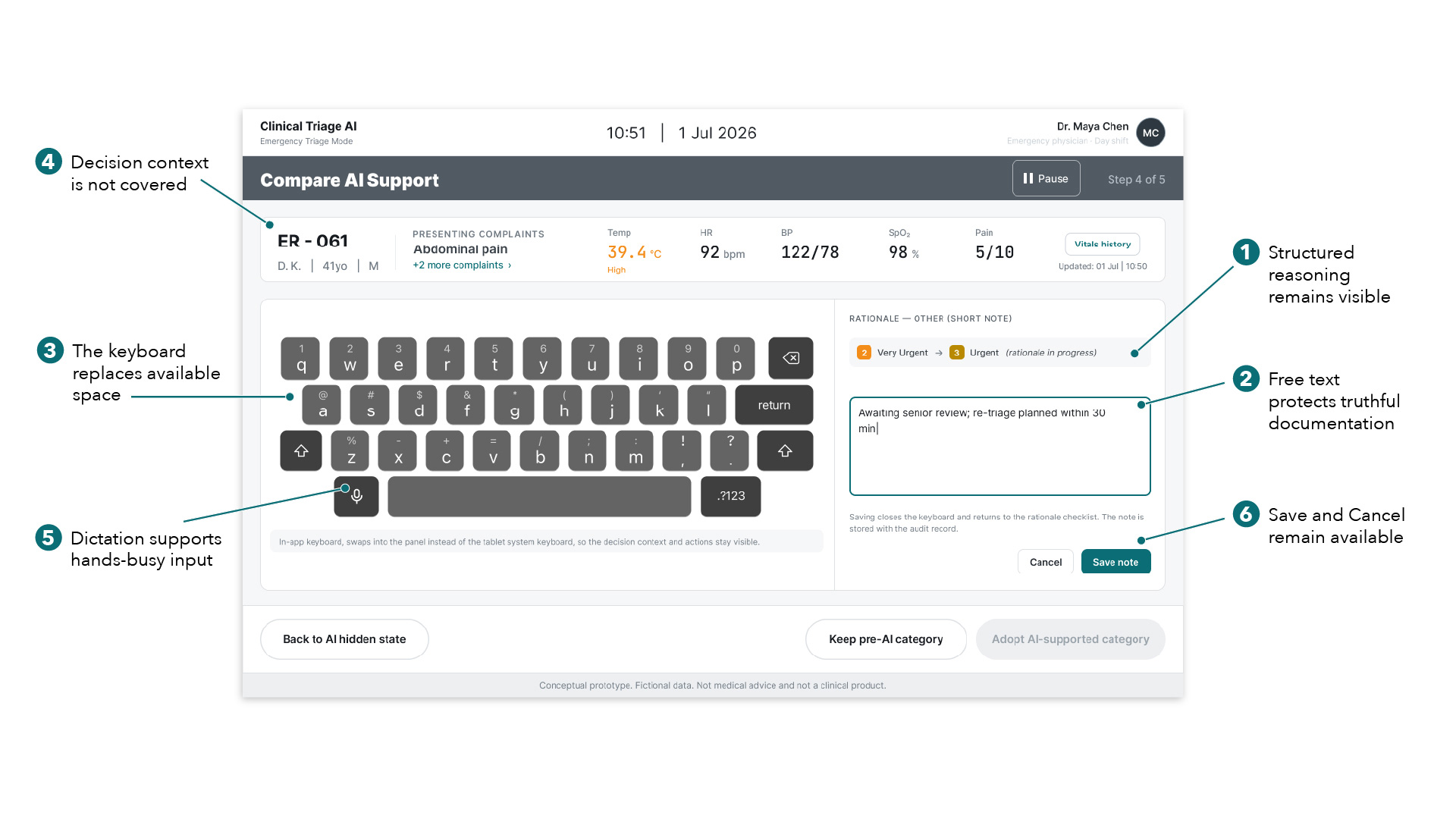
The structured rationale checklist doesn’t cover every real clinical reason. When it doesn’t, Dr. Chen can switch to a free-text field with dictation support, without losing sight of the category change or her other actions — the keyboard is built into the layout, not laid over it.
The free-form route protects accuracy when the structured rationale vocabulary is not enough.
The Decision
Kept a free-text escape route with dictation, rather than forcing every judgement into a predefined list.
WHAT THIS EXPOSED
Structured input can be faster and still less truthful, if there’s no honest way out when the options don’t fit.
WHAT I WOULD VALIDATE NEXT
The pattern on an actual tablet, with gloves, background noise, and real interruptions.
05
Showing the record before making it permanent
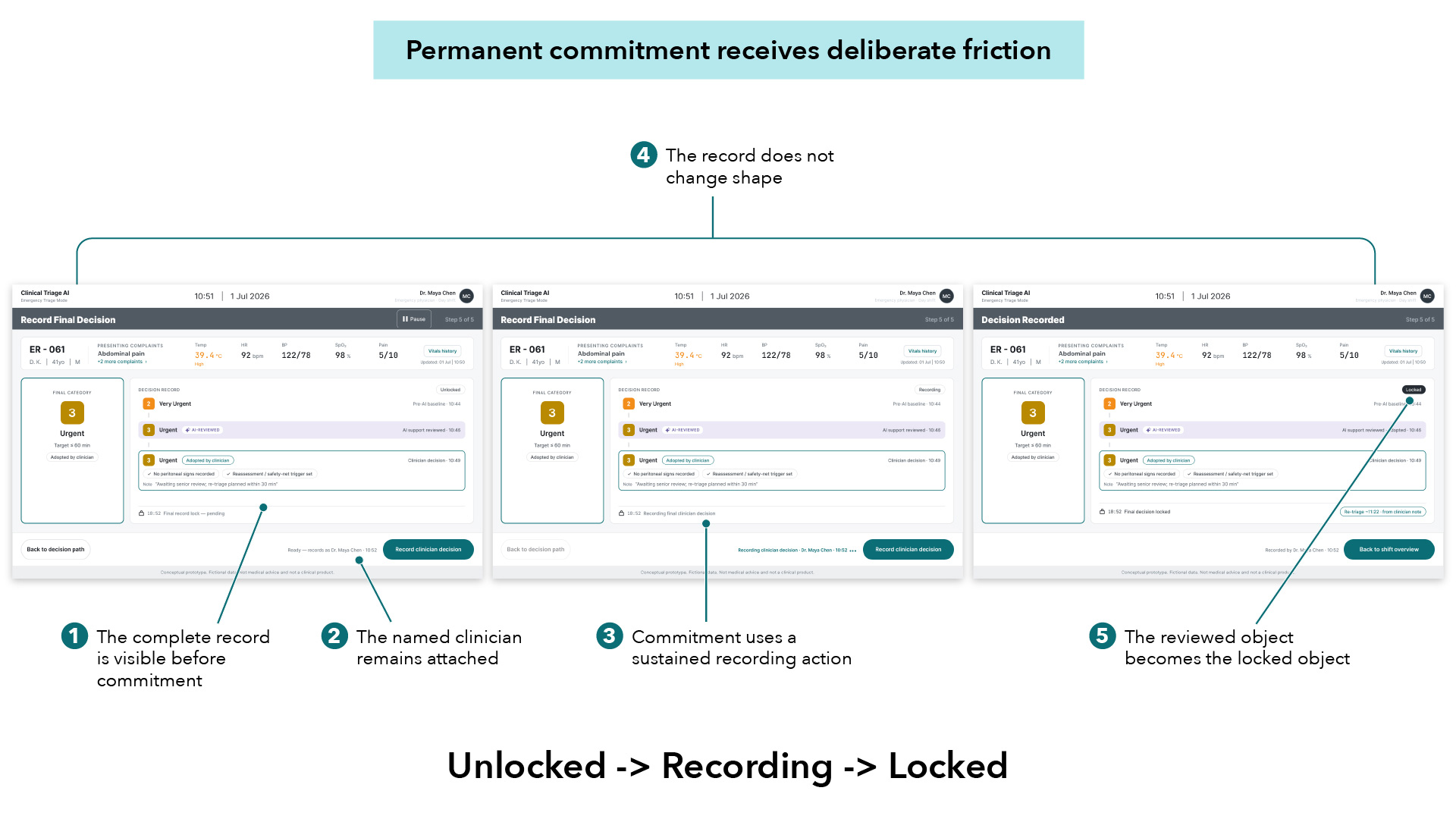
Before anything locks, Dr. Chen sees the complete record exactly as it will be preserved: her provisional category, the AI’s reviewed suggestion, and her final decision. She commits by holding one action through Unlocked, Recording, and Locked — the same surface throughout, never swapped for a separate confirmation screen.
The same record surface moves from unlocked to recording to locked — nothing is swapped out at the moment of commitment.
The Decision
Used a sustained hold on the same record surface, instead of a detached confirmation modal.
WHAT THIS EXPOSED
Deliberateness can come from interaction physics, not more copy asking “are you sure?”
WHAT I WOULD VALIDATE NEXT
Accessibility, motor variability, and recovery if the hold is interrupted partway through.
06
Treating AI disagreement as a valid outcome
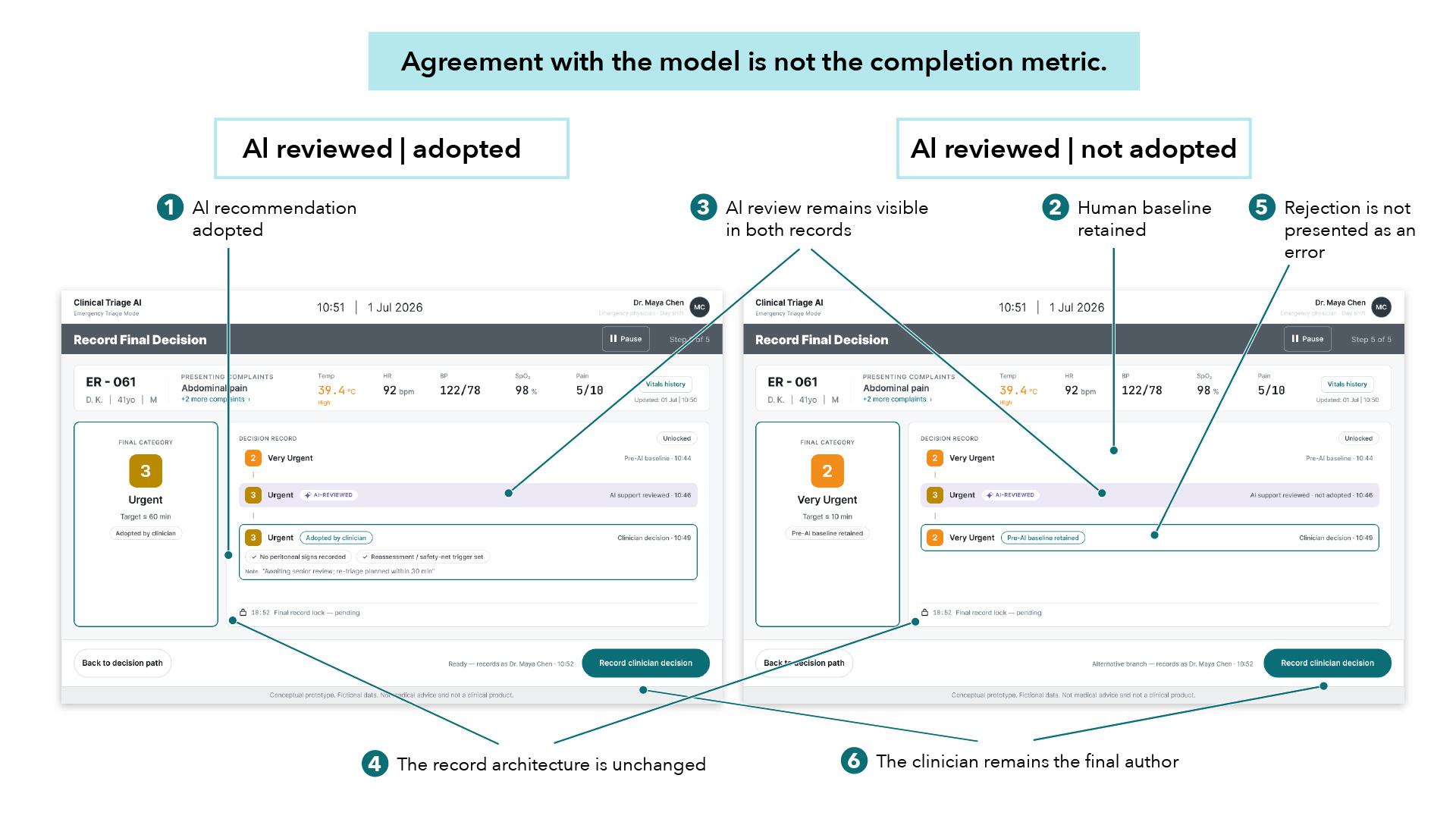
Dr. Chen can adopt the AI suggestion, keep her original category, or skip the AI entirely. Each path ends in the same record structure.
Two branches, one architecture: adopting and retaining the human baseline produce structurally identical records.
The Decision
Gave AI-adopted and AI-rejected outcomes equal structural treatment — same layout, same weight, same completion path.
WHAT THIS EXPOSED
Products can quietly pressure agreement through hierarchy and styling alone, even without ever requiring it explicitly.
WHAT I WOULD VALIDATE NEXT
Whether clinicians actually feel equally free to adopt, reject, or skip the AI’s suggestion.
07
Preserving honest incompleteness
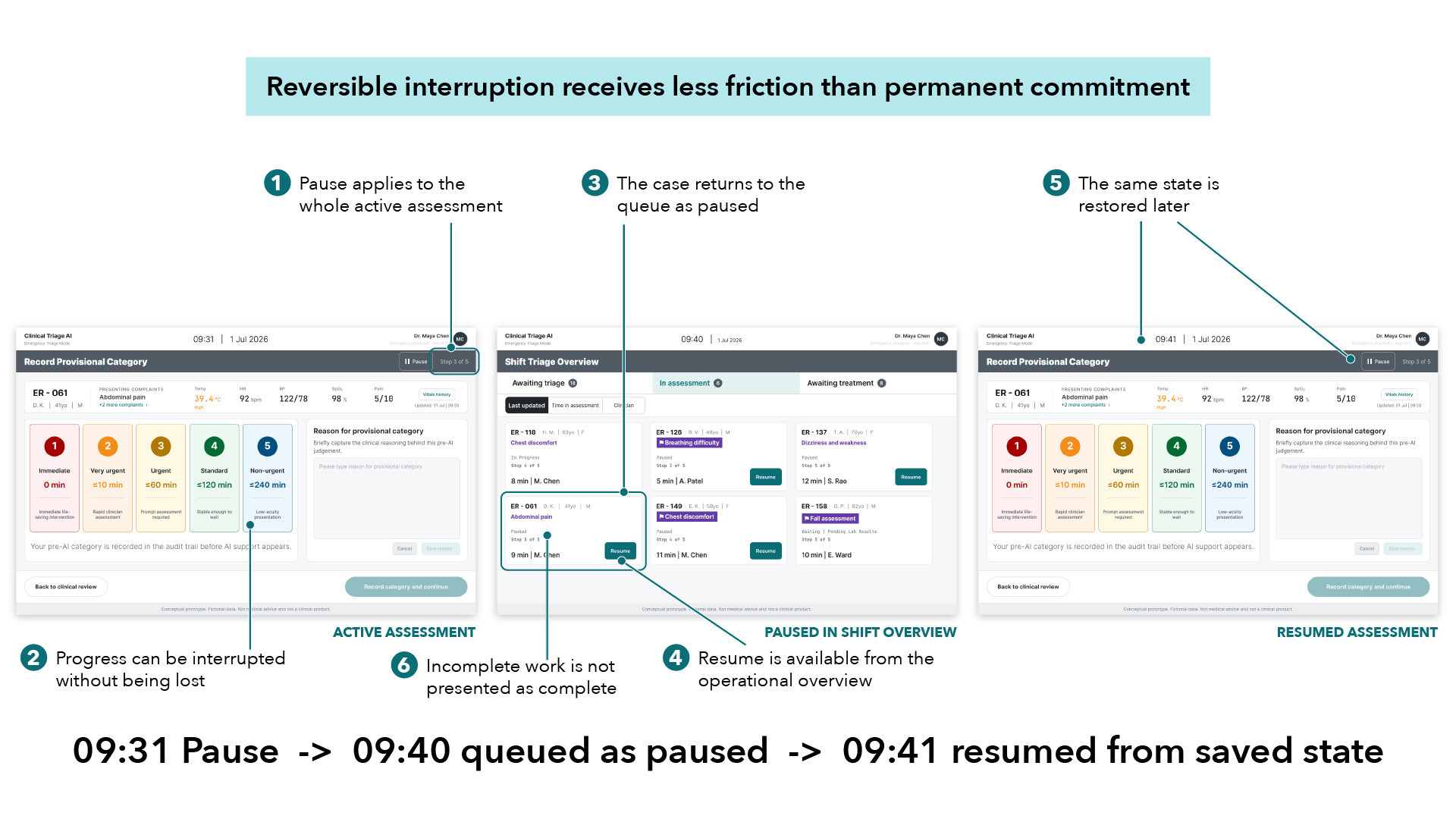
Partway through ER-061’s assessment, Dr. Chen is pulled away. One tap pauses the case — it autosaves and returns to the Shift Overview, still visibly “In assessment,” never marked complete. When she comes back, everything she’d recorded is exactly where she left it.
Pause, autosave, and resume — the same case, three moments apart, with no progress lost and no state misrepresented.
The Decision
Made Pause a single autosaving tap, available any time during active assessment, removed only once recording or locking begins.
WHAT THIS EXPOSED
Not every action in a high-stakes tool needs high friction — reversible interruption deserves speed, not caution.
WHAT I WOULD VALIDATE NEXT
Recovery after long interruptions, session expiry, or connectivity loss.
08
Locking decisions without freezing the patient
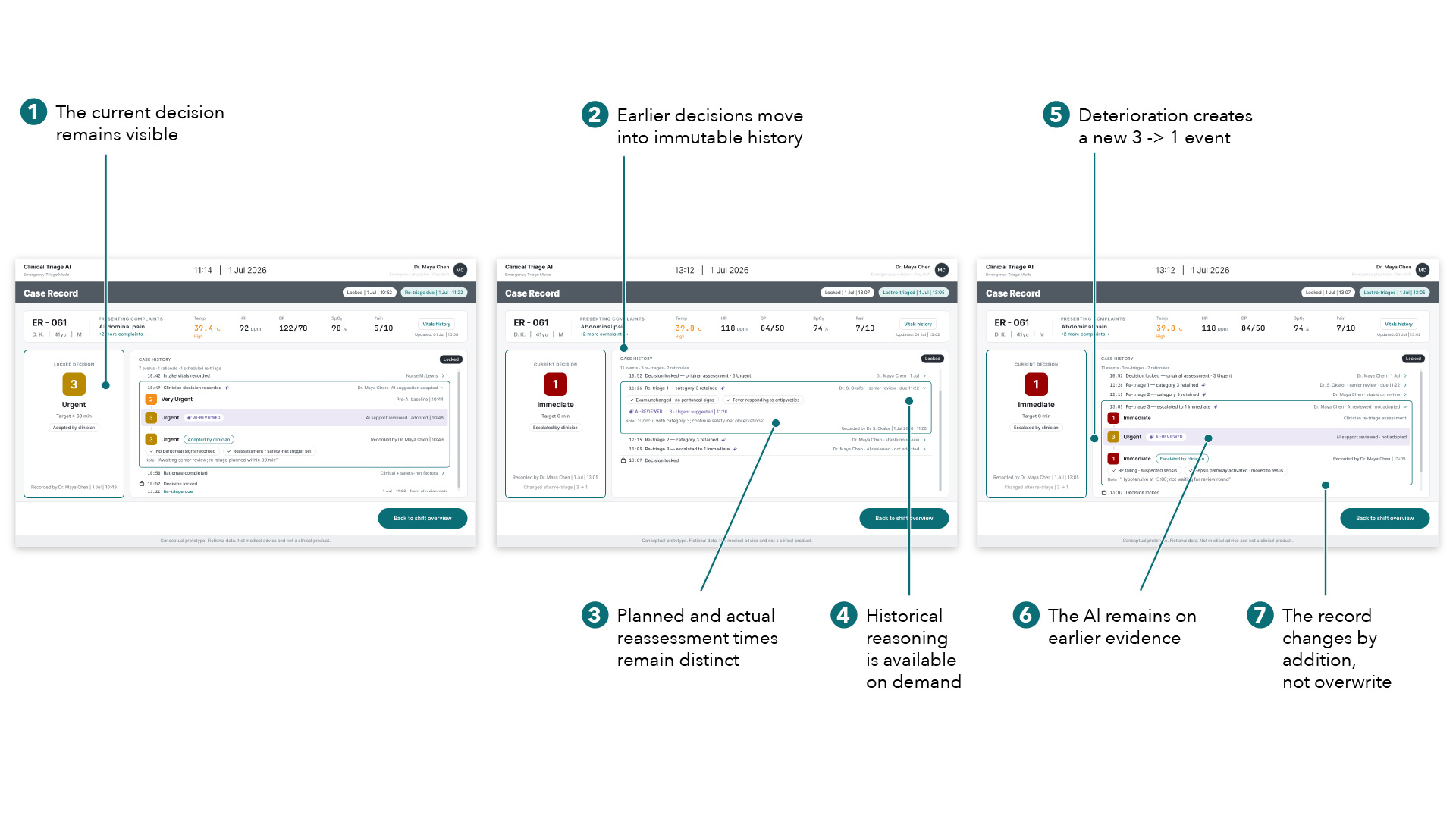
ER-061’s condition changes after the first decision locks. Two re-triages retain category 3; then a real deterioration escalates the current decision to 1 – Immediate, while the AI’s earlier suggestion, based on older evidence, stays visible in the history rather than disappearing. Nothing gets overwritten. The record only grows.
Each assessment remains attributable and preserved, even as the active case continues to change.
The Decision
Modelled re-triage as append-only, timestamped events, and renamed “Final category” to “Current decision.”
WHAT THIS EXPOSED
Auditability and change aren’t opposites — a system can hold what was believed earlier while the operative truth keeps evolving.
WHAT I WOULD VALIDATE NEXT
Longer, messier cases — multiple clinicians, delayed results, repeated AI review.
09
Saying plainly what isn’t proven yet
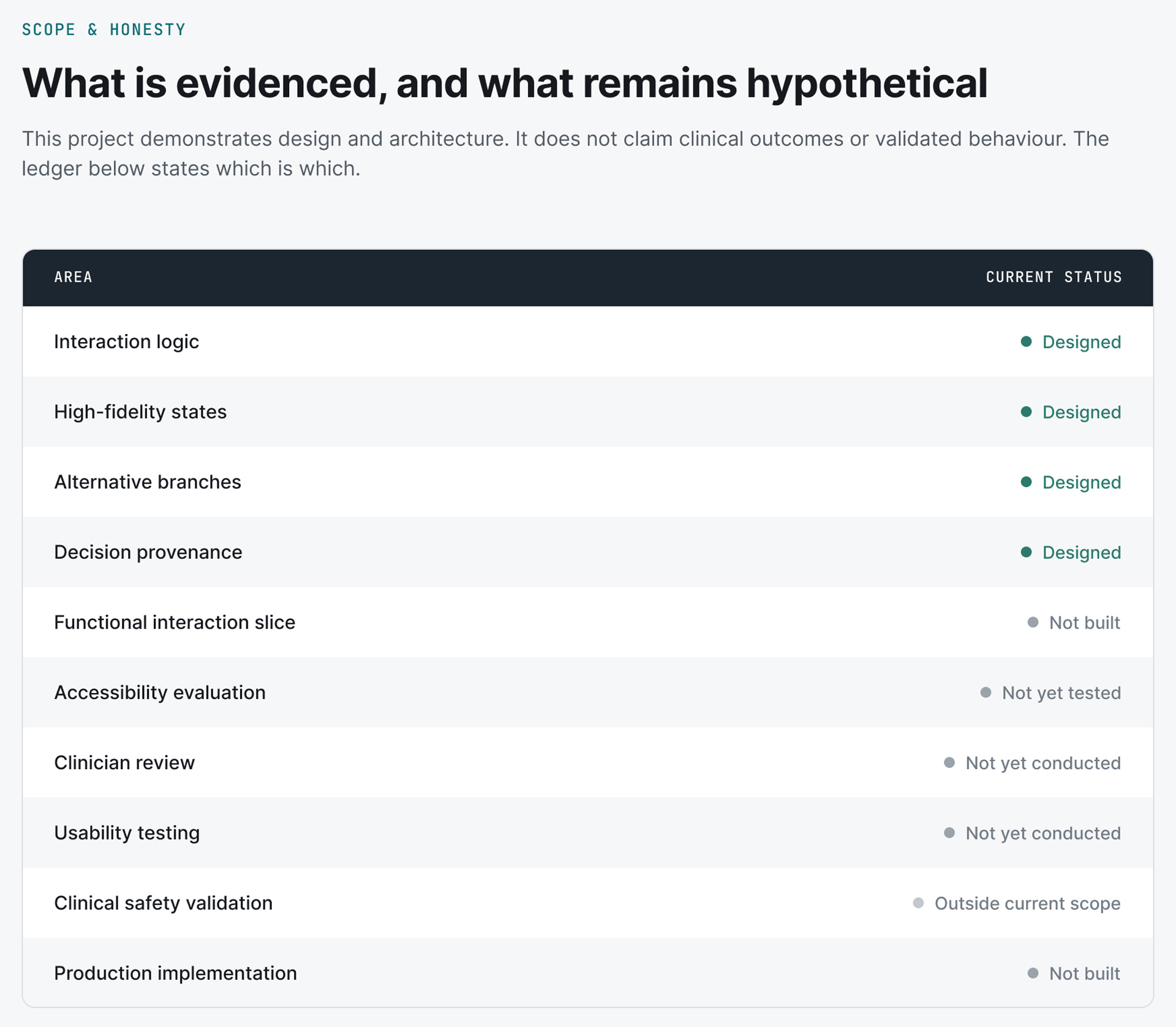
This project demonstrates interaction architecture, high-fidelity states, and decision provenance in detail. It does not demonstrate validated clinician behaviour, accessibility compliance, or clinical safety — and rather than let careful design language imply otherwise, the ledger below states the difference plainly.
What this project can support as evidence, and what it cannot: stated plainly rather than left for the reader to guess.
The Decision
Built an explicit ledger of what’s designed, what’s tested, and what’s outside scope, instead of letting visual polish imply more validation than exists.
WHAT THIS EXPOSED
A careful, hedged tone can itself read as an absence of execution — unless the boundaries are stated as plainly as the decisions.
WHAT I WOULD VALIDATE NEXT
Everything the ledger marks as not yet done, starting with clinician review.
The Principle
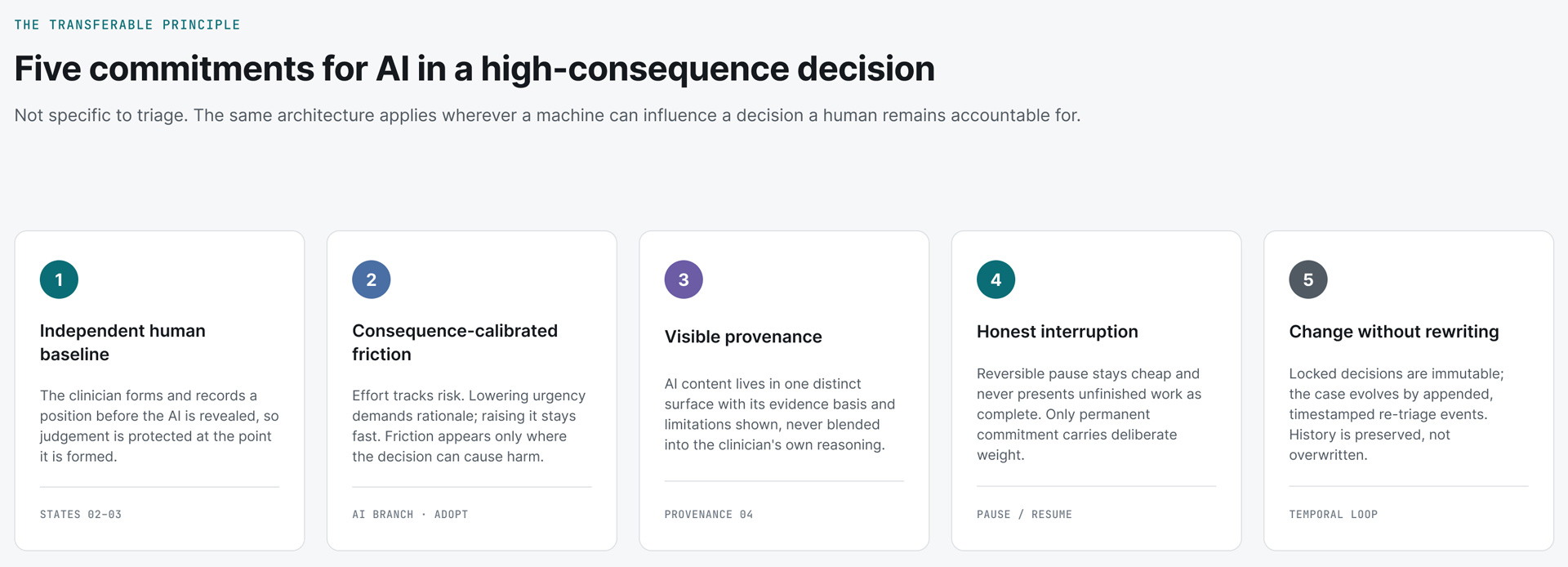
AI supports judgment. It does not replace responsibility.
When AI can influence a high-consequence decision, the product should preserve an independent human baseline, calibrate friction to consequence, keep provenance visible, allow honest interruption, and record change without rewriting history.